
TOON Format
Token-Oriented Object Notation (TOON) is a compact data format designed for LLM consumption. Agentic Forge uses TOON to reduce token usage in tool results by 15-40%, scaling with data size.
Why TOON?
JSON is verbose. Every key repeats for every object in an array. TOON uses headers and delimiters instead:
JSON:
json
[{"name": "John", "email": "john@x.com", "status": "active"},
 {"name": "Jane", "email": "jane@x.com", "status": "pending"}]
TOON:
name|email|status
John|john@x.com|active
Jane|jane@x.com|pending
Benefits
| Benefit | Description |
|---|---|
| 15-40% token savings | Measured across weather, search, and database results |
| LLM-friendly | Models understand TOON as well or better than JSON |
| Transparent | Conversion happens in Armory; MCP servers return JSON unchanged |
| Smart conversion | Only uses TOON when it's actually smaller than JSON |
How It Works
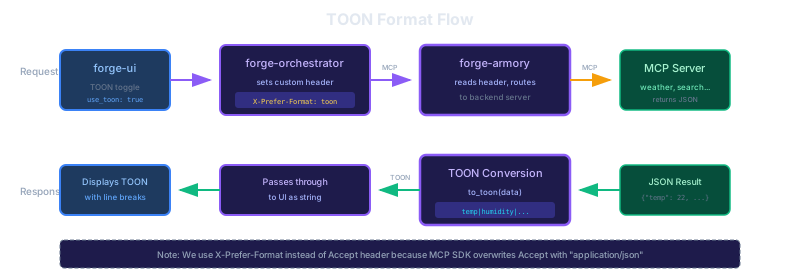
- Client sends
X-Prefer-Format: toonheader (orAccept: text/toon) - Armory routes the tool call to the backend MCP server
- MCP server returns JSON (no changes needed)
- Armory converts JSON to TOON before returning to client
When TOON Helps Most
| Data Type | Savings | Example |
|---|---|---|
| Uniform arrays | 40-50% | Database rows, search results |
| Flat objects | 20-30% | Weather data, API responses |
| Tabular data | 40-60% | CSV-like data, listings |
When to Use JSON
TOON is less effective for:
- Deeply nested structures
- Non-uniform arrays (objects with different keys)
- Small responses (overhead may exceed savings)
Armory compares both formats and only uses TOON when it provides actual benefit.
Configuration
Enable TOON in Armory:
yaml
# armory.yaml
result_transformer:
  toon_enabled: true
Request TOON format from clients:
GET /mcp
X-Prefer-Format: toon