
Anvil
MCP client tool for testing and debugging MCP servers. Provides both a CLI for quick terminal testing and a web-based inspector for interactive exploration.
Why "Anvil"?
In a forge, the anvil is where you test and shape your tools. Forge Anvil serves the same purpose for MCP servers — it's where you test, debug, and refine your tools during development.
Features
| Feature | Description |
|---|---|
| CLI Interface | Test MCP servers directly from the command line |
| Web UI | Interactive browser-based inspector for exploring tools |
| No Build Step | Web UI is a single HTML file with Vue.js — just serve and use |
| JSON Output | Machine-readable output for scripting and automation |
Installation
bash
# Clone the repository
git clone https://github.com/agentic-forge/forge-anvil.git
cd forge-anvil

# Install dependencies
uv sync
CLI Usage
Basic Commands
bash
# Show server info
anvil info --server http://localhost:8000/mcp

# List available tools
anvil list-tools

# Call a tool with arguments
anvil call get_current_weather --arg city=Berlin

# Call with JSON arguments
anvil call get_forecast --json-args '{"city": "Tokyo", "days": 3}'

# Output as JSON (for scripting)
anvil list-tools --json

# List resources and prompts
anvil list-resources
anvil list-prompts

# Check if server is responsive
anvil ping
Environment Variable
Set ANVIL_SERVER to avoid passing --server every time:
bash
export ANVIL_SERVER=http://localhost:8000/mcp
anvil list-tools
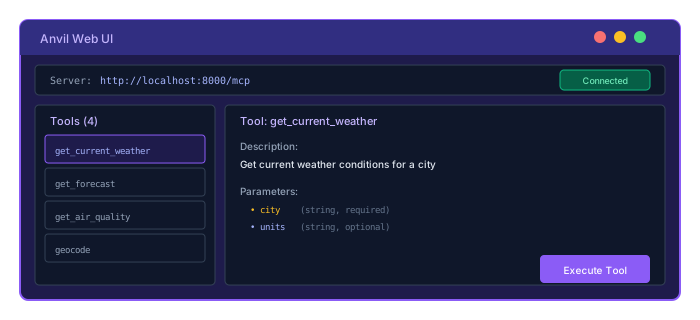
Web UI
Launch the interactive inspector:
bash
anvil ui --port 5000Open http://localhost:5000 in your browser.
Example: Testing mcp-weather
Terminal 1 — Start the MCP server:
bash
cd /path/to/agentic-forge/mcp-servers/mcp-weather
uv sync
uv run python -m forge_mcp_weather
# Server starts at http://localhost:8000/mcp
Terminal 2 — Use Anvil to test:
bash
# Set the server URL
export ANVIL_SERVER=http://localhost:8000/mcp

# Check server info
anvil info

# List available tools
anvil list-tools

# Get current weather
anvil call get_current_weather --arg city=Berlin

# Get weather with imperial units
anvil call get_current_weather --arg city="New York" --arg units=imperial

# Get 5-day forecast
anvil call get_forecast --json-args '{"city": "Tokyo", "days": 5}'

# Get air quality
anvil call get_air_quality --arg city=Beijing
Integration with Forge MCP Servers
Anvil works with any MCP server, but integrates seamlessly with Forge MCP servers built with FastMCP:
bash
# Start any Forge MCP server
uv run python -m forge_mcp_<server_name>

# Test with Anvil
anvil list-tools --server http://localhost:8000/mcp
Use Cases
| Scenario | Command |
|---|---|
| Quick health check | anvil ping |
| Discover available tools | anvil list-tools |
| Test a specific tool | anvil call <tool> --arg key=value |
| Interactive exploration | anvil ui |
| CI/CD integration | anvil list-tools --json |