
Interfaces
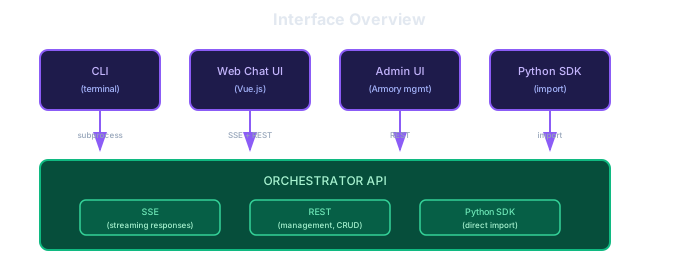
Multiple ways to interact with Agentic Forge: CLI for terminal users, SSE API for real-time streaming, and Python SDK for direct integration.
Interface Overview
Why SSE over REST?
REST's request-response model doesn't fit LLM agents well:
| Challenge | REST Problem | SSE Solution |
|---|---|---|
| Streaming tokens | Wait for complete response | Stream as generated |
| Long-running tasks | Timeouts, no progress | Persistent connection |
| Tool call progress | No visibility | Real-time events |
| Heartbeats | Connection drops | Built-in ping events |
Recommended: SSE + REST Hybrid
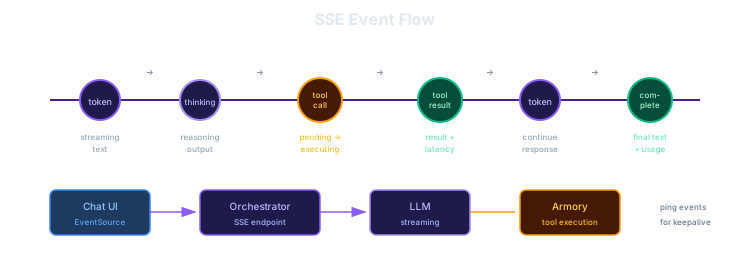
SSE /conversations/{id}/stream | REST /api/v1/* |
|---|---|
| Token streaming | Health check |
| Tool call progress | List conversations |
| Thinking events | Get conversation history |
| Completion events | Configuration |
| Heartbeat pings | Model/tool management |
SSE Protocol
Client → Server (REST)
bash
# Create a conversation
POST /conversations
Content-Type: application/json

{"system_prompt": "You are a research assistant"}

# Send a message
POST /conversations/{id}/messages
Content-Type: application/json

{"content": "Search for AI news"}

# Cancel generation
POST /conversations/{id}/cancel
Server → Client (SSE Stream)
Connect to GET /conversations/{id}/stream to receive events:
event: token
data: {"token": "The", "cumulative": "The"}

event: thinking
data: {"content": "Let me search for recent AI news..."}

event: tool_call
data: {"id": "tc_1", "name": "web_search", "arguments": {"query": "AI news"}, "status": "pending"}

event: tool_call
data: {"id": "tc_1", "name": "web_search", "status": "executing"}

event: tool_result
data: {"id": "tc_1", "result": {...}}

event: complete
data: {"usage": {"prompt_tokens": 150, "completion_tokens": 200}}

event: ping
data: {}
CLI Interface
Commands
bash
# Interactive chat
agentic-forge chat

# Single query
agentic-forge run "Search for AI news and summarize"

# With options
agentic-forge run "Complex task" \
  --model smart \
  --max-iterations 20 \
  --output json

# Connect to remote orchestrator
agentic-forge chat --server http://localhost:8001
Interactive Mode
$ agentic-forge chat

Agentic Forge v0.1.0
Connected to Armory at localhost:8000
Using model: gpt-4o

You: Search for recent AI news

[Calling brave_search("AI news 2025")...]
Found 10 results

Here are the top AI news stories from today:
1. ...

You: /quit
Armory Admin API
REST API for managing the Armory:
| Method | Endpoint | Description |
|---|---|---|
| GET | /api/v1/sources | List registered MCP servers |
| POST | /api/v1/sources | Register new MCP server |
| DELETE | /api/v1/sources/ | Remove MCP server |
| GET | /api/v1/tools | List all available tools |
| GET | /api/v1/health | Health check |
Summary
| Interface | Use Case | Protocol |
|---|---|---|
| Python SDK | Python applications | Direct import |
| SSE API | Web/mobile, real-time streaming | HTTP + SSE |
| REST API | Management, CRUD operations | HTTP |
| CLI | Terminal users | Subprocess |
| Admin API | Armory management | REST |