
Armory
The Protocol Gateway that aggregates multiple tool sources and exposes them through a unified MCP interface, with built-in protocol translation and token optimization.
Why "Armory"?
Just as a forge creates tools and an armory stores them, the Armory is where you go to access all your tools. It aggregates tools from various sources and provides them through a single, consistent interface.
The OpenRouter Analogy
Armory is to MCP servers what OpenRouter is to LLMs — one unified interface to many backends.
| Aspect | OpenRouter | Armory |
|---|---|---|
| Aggregates | LLM providers | MCP servers & tool sources |
| Protocol | OpenAI-compatible API | MCP (Streamable HTTP) |
| Client sees | One API, many models | One endpoint, many tools |
Architecture
Hybrid Gateway Pattern
Armory exposes multiple MCP endpoints, giving clients flexibility:
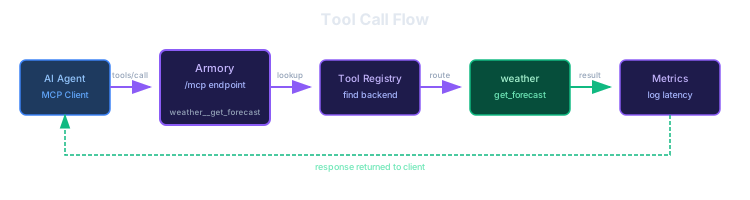
Endpoints:
/mcp→ Aggregated (all tools with prefixes)/mcp/weather→ Direct access to weather server/mcp/search→ Direct access to search server/.well-known/mcp.json→ Discovery metadata
Why hybrid? Clients wanting simplicity connect to /mcp (one connection, all tools). Clients wanting isolation connect to /mcp/{server} (specific server only).
Key Features
Unified MCP Interface
Orchestrators connect to the Armory as a single MCP server. They don't need to know about the various backends - they just see a collection of tools.
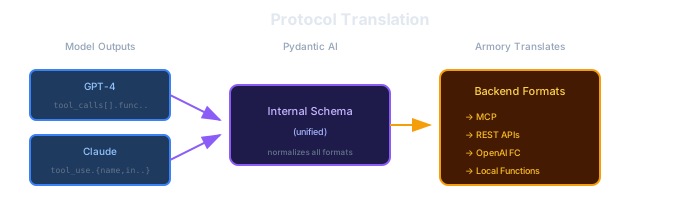
Protocol Translation
The Armory translates between different protocol formats automatically:
Result Transformation (JSON → TOON)
Tool results are automatically converted to TOON format for token efficiency. Send Accept: text/toon header to enable.
Before (JSON):
[{"name": "John", "email": "john@x.com", "status": "active"},
 {"name": "Jane", "email": "jane@x.com", "status": "pending"}]
After (TOON):
@users [2] {name|email|status}
John | john@x.com | active
Jane | jane@x.com | pending
~40% fewer tokens, and LLMs actually understand TOON better than JSON (73.9% accuracy vs 69.7% in benchmarks).
Transport: Streamable HTTP
The Armory uses MCP's Streamable HTTP transport (not the deprecated SSE transport):
| Transport | Status | Use Case |
|---|---|---|
| stdio | Active | Local subprocess |
| HTTP+SSE | Deprecated | Legacy remote |
| Streamable HTTP | Current | Remote (single endpoint) |
Benefits of Streamable HTTP:
- Single endpoint -
/mcphandles everything - Resumable streams -
Last-Event-IDheader - Session management -
Mcp-Session-Idheader - Infrastructure friendly - Works with proxies, load balancers
Protocol Adapters
| Adapter | Backend Type | Translation |
|---|---|---|
| MCPAdapter | MCP Servers | Mostly passthrough |
| RESTAdapter | REST APIs | HTTP methods, auth headers |
| OpenAIFCAdapter | OpenAI FC services | OpenAI function format |
| LocalAdapter | Python functions | Direct invocation |
MCP Server Strategy
Don't reinvent the wheel. Use existing MCP servers where available, build custom only when needed.
| Category | Servers | Notes |
|---|---|---|
| Use Existing | Brave Search, GitHub (remote), fetch, filesystem, time | Well-tested, maintained by others |
| Build Custom | weather (Open-Meteo), uptime checker, notes | FastMCP + Python, learn the patterns |
Free APIs for Custom Servers
- Open-Meteo — Weather data, no API key required (open-meteo.com)
- Brave Search — 2,000 queries/month free (brave.com/search/api)
Configuration
# armory.yaml
server:
  host: "0.0.0.0"
  port: 8000
  transport: "streamable_http"

tool_rag:
  enabled: true
  embedding_model: "text-embedding-3-small"
  similarity_threshold: 0.5

result_transformer:
  toon_enabled: true

sources:
  # Existing MCP servers (npm packages)
  - type: mcp
    name: "brave-search"
    command: "npx"
    args: ["-y", "@modelcontextprotocol/server-brave-search"]
    env:
      BRAVE_API_KEY: "${BRAVE_API_KEY}"

  - type: mcp
    name: "filesystem"
    command: "npx"
    args: ["-y", "@modelcontextprotocol/server-filesystem", "/allowed/path"]

  # Remote MCP servers (hosted by provider)
  - type: mcp
    name: "github"
    url: "https://api.github.com/mcp"
    auth: oauth

  # Custom MCP servers (FastMCP)
  - type: mcp
    name: "weather"
    command: "python"
    args: ["-m", "forge_mcp_servers.weather"]

  - type: mcp
    name: "notes"
    command: "python"
    args: ["-m", "forge_mcp_servers.notes"]
Benefits
| Problem | Solution |
|---|---|
| Multiple tool sources | Single MCP interface |
| Different protocols | Protocol adapters translate |
| JSON wastes tokens | TOON transformation |
| Too many tools in context | Tool RAG filters dynamically |
| Managing MCP servers | Centralized configuration |