
TOON Format: Cutting Tokens Without Cutting Information
January 2026
When AI agents use tools, the results often come back as verbose JSON. A simple weather lookup might return 500 tokens of data when the actual information fits in 50. We added TOON format support to Agentic Forge to reduce token usage by 30-60% while preserving all the data.
What is TOON?
TOON (Token-Oriented Object Notation) is a compact data format designed specifically for LLM consumption. It uses whitespace-delimited values with headers instead of JSON's verbose key-value syntax.
Here's the same weather data in both formats:
JSON (typical MCP response):
{
  "location": "London",
  "current": {
    "temperature": 18,
    "humidity": 72,
    "conditions": "Partly cloudy",
    "wind_speed": 12
  },
  "forecast": [
    {"day": "Monday", "high": 20, "low": 14, "conditions": "Sunny"},
    {"day": "Tuesday", "high": 19, "low": 13, "conditions": "Cloudy"},
    {"day": "Wednesday", "high": 17, "low": 12, "conditions": "Rain"}
  ]
}
TOON (same data, fewer tokens):
location: London
current:
  temperature: 18
  humidity: 72
  conditions: Partly cloudy
  wind_speed: 12

day|high|low|conditions
Monday|20|14|Sunny
Tuesday|19|13|Cloudy
Wednesday|17|12|Rain
The TOON version uses pipe-delimited tables for uniform arrays, eliminating repeated keys. For the forecast data alone, this cuts tokens by roughly 50%.
The Implementation Challenge
Adding TOON support seemed simple: set an Accept: text/toon header when calling Armory. But there was a problem.
The MCP SDK overwrites the Accept header.
The mcp Python library's _prepare_headers() method forces Accept: application/json, text/event-stream, and this happens after user headers are merged. No amount of header configuration could fix this.
The Solution: Custom Header
Instead of fighting the SDK, we introduced a custom header that the SDK doesn't touch: X-Prefer-Format: toon. Armory checks this header first, falling back to the standard Accept header for non-MCP clients.
The Full Flow
Here's how TOON format flows through the system:
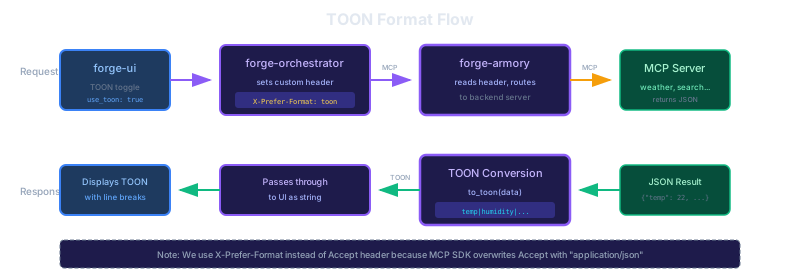
- forge-ui — User enables TOON toggle, stored in conversation settings
- forge-orchestrator — Adds
X-Prefer-Format: toonheader to MCP requests - forge-armory — Routes tool call to backend MCP server
- MCP Server — Returns JSON (servers don't need TOON support)
- forge-armory — Converts JSON response to TOON using
toonlibrary - Response flows back — TOON string returns through orchestrator to UI
The key insight: conversion happens in Armory, not in backends. MCP servers continue returning JSON. Armory acts as a translation layer, converting to TOON when the client requests it.
Smart Conversion
TOON isn't always smaller than JSON. For deeply nested objects or non-uniform arrays, JSON might actually be more compact. Armory compares both formats and only uses TOON when it provides actual benefit.
UI Display
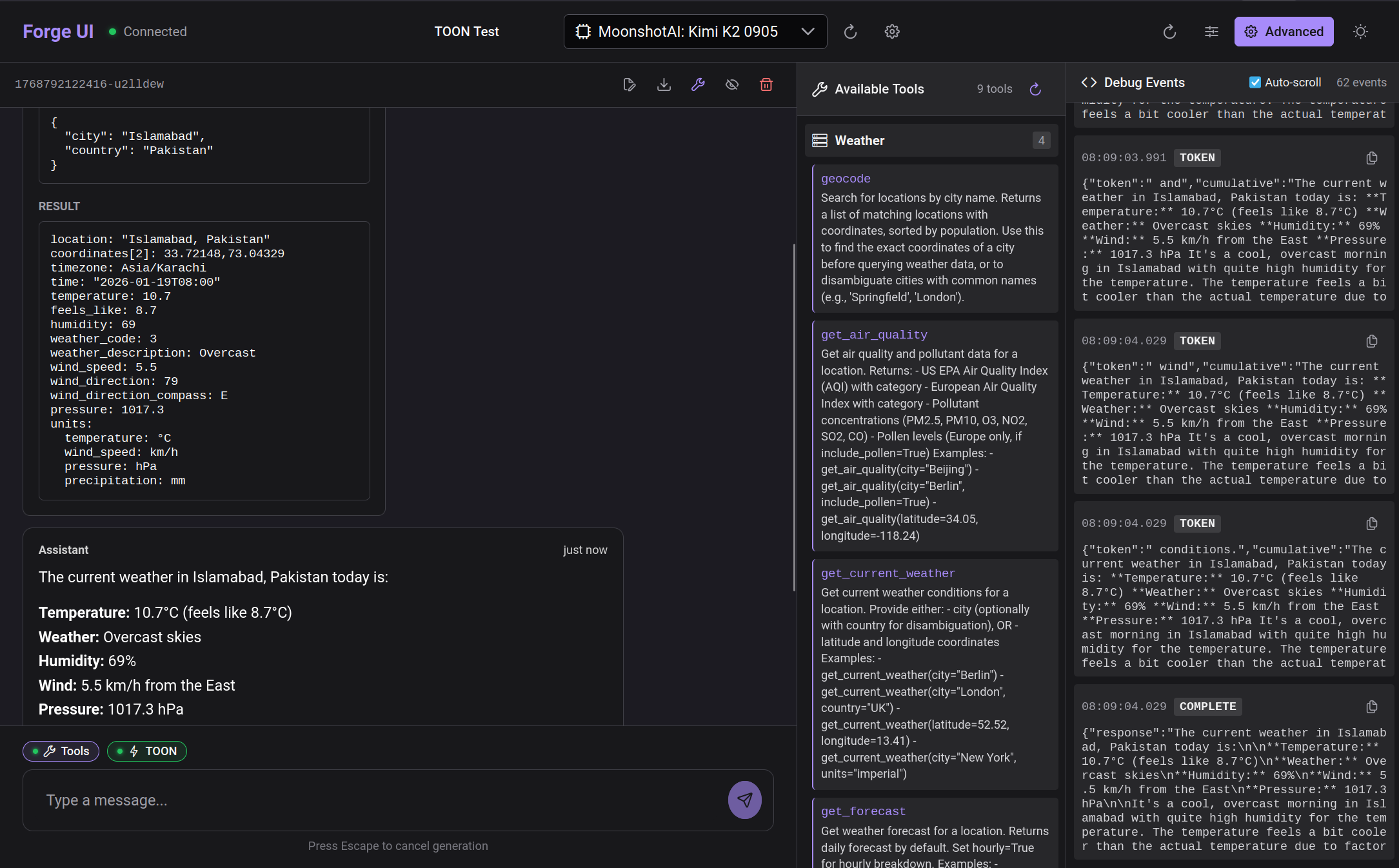
Tool results now display differently based on format. JSON results get pretty-printed with indentation. TOON results display as plain text with proper line breaks.
Results
With TOON enabled, we see 30-60% token reduction on tool results with tabular data (weather forecasts, search results, database queries). The format is especially effective for:
- Uniform arrays — Lists of similar objects
- Flat data — Single-level key-value pairs
- Tabular results — Database rows, API listings
It's less effective for deeply nested JSON or highly irregular structures, where the overhead of TOON headers may exceed JSON's verbosity.
Try It
- Start Agentic Forge with Docker Compose
- Open the chat interface
- Enable the TOON toggle in settings
- Ask about the weather or run a search
- Expand the tool call card to see the TOON result
Source Code
- forge-armory — TOON conversion and format negotiation
- forge-orchestrator — X-Prefer-Format header handling
- forge-ui — TOON toggle and display
- toon-format/toon — The TOON library
This is part of a series on building Agentic Forge.