
Agentic Forge Demo is Live
January 2026
Try Agentic Forge at agentic-forge.compulife.com.pk — a working AI agent with tool access, running the full stack we've been building.
Quick Start
- Get an API key — OpenRouter is the easiest option (one key, 300+ models)
- Open the demo — agentic-forge.compulife.com.pk
- Add your key — Click the gear icon next to the model selector, enter your OpenRouter key, then click the check button to save
- Fetch models — Click the "Fetch" button to load available models from your provider
- Select a model — Good options include
google/gemini-3-flash-preview,moonshotai/kimi-k2-0905, ordeepseek/deepseek-v3.2 - Start chatting — Try asking about the weather or searching the web
That's it. Your API key is stored in your browser only—we never see or store it.
Built-in Tools
The demo comes with three MCP servers pre-configured—two built by us, one third-party:
| Server | Source | Tools | Example Queries |
|---|---|---|---|
| Weather | Agentic Forge | Current conditions, forecasts, historical data | "What's the weather in Tokyo?" |
| Web Search | Agentic Forge | Brave Search API | "Search for recent news about AI agents" |
| HuggingFace | Third-party | Model info, datasets, spaces | "Find popular text-to-image models" |
All three work seamlessly through Armory, our MCP gateway. The agent discovers relevant tools automatically using Tool RAG—you don't need to specify which tool to use.
Add Your Own Tools
Have an MCP server? Connect it directly:
- Open the tools panel (wrench icon)
- Click "Add Custom Server"
- Enter the URL (and API key if required)
- Your tools appear alongside the built-in ones
Custom servers work for the current session only. See BYOK and Custom MCP Servers for details.
What You're Running
The demo runs the full Agentic Forge stack:
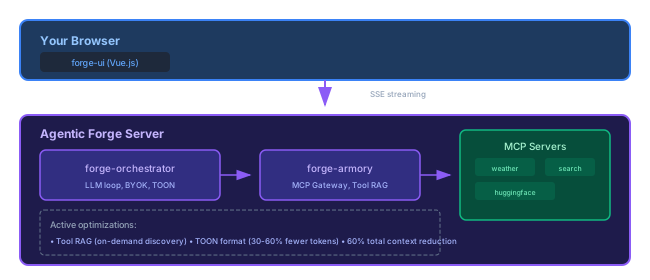
All the optimizations we've written about are active:
- Tool RAG — Agent discovers tools on-demand instead of loading all 18
- TOON format — Tool results use 30-60% fewer tokens
- Combined: 60% context reduction — More room for conversation
Known Limitations
This is a demo deployment:
- No Armory admin access — The Armory admin UI is not exposed in the demo to keep the base configuration consistent for everyone and prevent excessive MCP server additions. You can still add custom MCP servers directly from the chat interface.
- Shared infrastructure — Not designed for production workloads
Want full control? Deploy your own instance using forge-devtools—everything is open source.
Feedback
Found a bug? Have a suggestion? Open an issue:
- forge-ui issues — UI/UX feedback
- forge-orchestrator issues — Agent behavior, model issues
- forge-armory issues — Tool and MCP issues
Self-Hosting
Want to run your own instance? The entire stack is open source:
git clone https://github.com/agentic-forge/forge-devtools
cd forge-devtools
cp .env.example .env  # Add your API keys
docker compose up
See the Getting Started Tutorial for detailed instructions.
Try the demo: agentic-forge.compulife.com.pk
This is part of a series on building Agentic Forge.