
Tool RAG: Dynamic Tool Discovery for AI Agents
January 2026
As tool libraries grow, AI agents face a problem: loading every tool definition into context wastes tokens and confuses models. We implemented Tool RAG in Agentic Forge to solve this—agents now discover tools on-demand through semantic search instead of loading them all upfront.
The Problem: Tool Overload
Traditional tool-calling agents receive all available tools in their system prompt. This works fine with 5-10 tools, but becomes problematic as the tool library grows:
- Context consumed by definitions — Each tool's name, description, and parameter schema takes tokens. With 20+ tools, this can easily exceed 3000 tokens before the conversation even starts.
- Model confusion — Research shows LLMs perform worse when presented with many similar tools. They may call the wrong one or hallucinate parameters.
- Doesn't scale — An agent with access to 100 tools would spend most of its context on tool definitions, leaving little room for conversation history.
What is Tool RAG?
Tool RAG applies Retrieval-Augmented Generation to tool selection. Instead of loading all tools upfront, the agent starts with a single meta-tool called search_tools. When the agent needs a capability, it describes what it's looking for, and semantic search returns only the relevant tools.
This approach comes from recent research. The ToolRAG paper demonstrated 3x improvement in tool selection accuracy and ~50% prompt token reduction compared to loading all tools.
Architecture
The difference is straightforward:
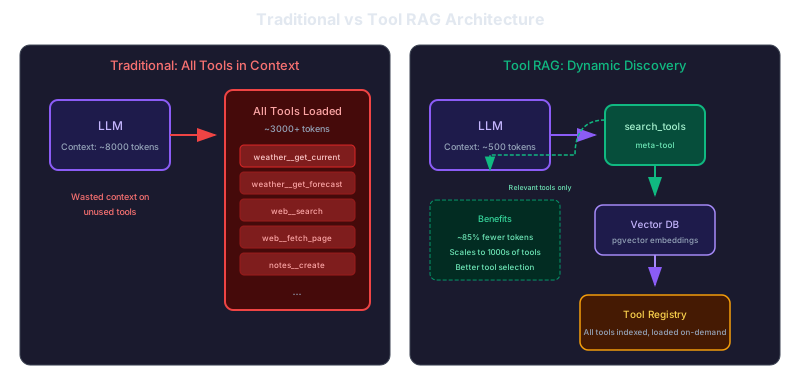
Traditional: The LLM receives all tool definitions in its context. Every request pays the token cost for tools that won't be used.
Tool RAG: The LLM receives only the search_tools meta-tool. When it needs a capability, it searches for relevant tools, which are then loaded into context for the next turn.
How It Works
Here's the flow when an agent handles a request like "What's the weather in London?":
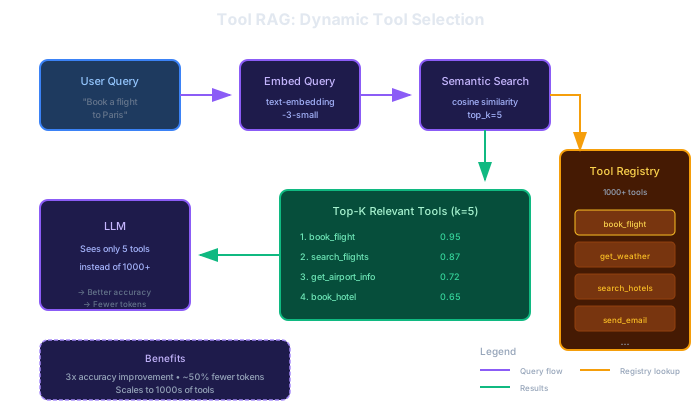
- Initial context — The agent sees only
search_toolsin its available tools - Tool search — The agent calls
search_toolswith a query like "get current weather for a city" - Semantic matching — The query is embedded and compared against tool description embeddings stored in pgvector
- Tools returned — All tools above the similarity threshold are returned (default: 0.5)
- Second turn — The discovered tools are available for the agent to call
- Task completion — The agent calls the appropriate tool with the user's parameters
The extra round-trip for tool discovery is handled automatically with auto-continue, so the user experience is seamless.
Implementation in Forge Armory
Armory exposes Tool RAG through a mode parameter on the MCP endpoint:
| Endpoint | Behavior |
|---|---|
/mcp | Standard mode — returns all tools |
/mcp?mode=rag | RAG mode — returns only search_tools |
When RAG mode is enabled, the search_tools meta-tool performs semantic search against the tool registry. The similarity threshold is configurable through the admin UI.
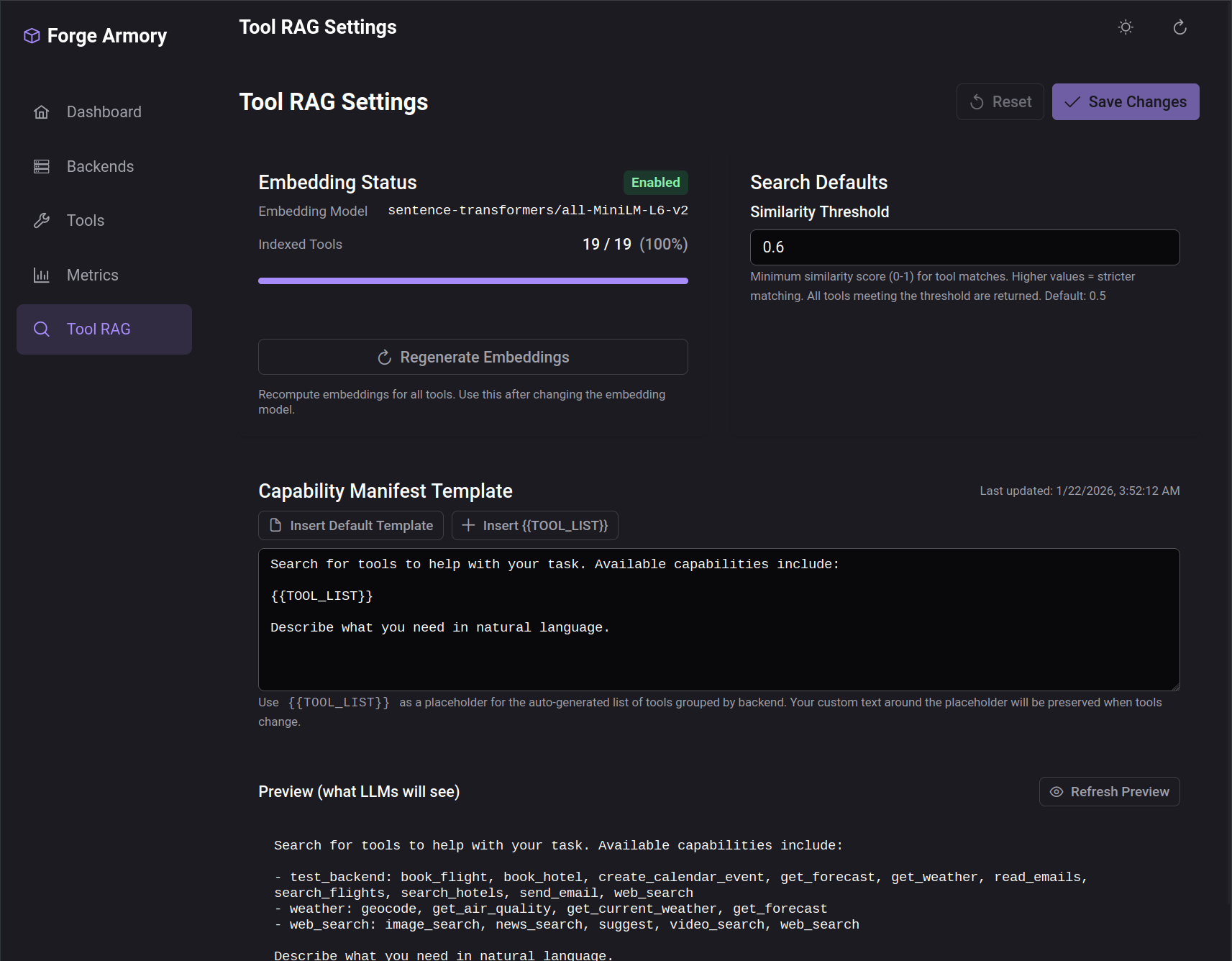
The UI also displays a capability manifest—a system prompt template that includes the {{TOOL_LIST}} placeholder. This gets populated with discovered tools after each search, letting you customize how tool capabilities are presented to the model.
Using Tool RAG
In forge-ui, Tool RAG can be enabled per-conversation with a toggle in the chat settings:
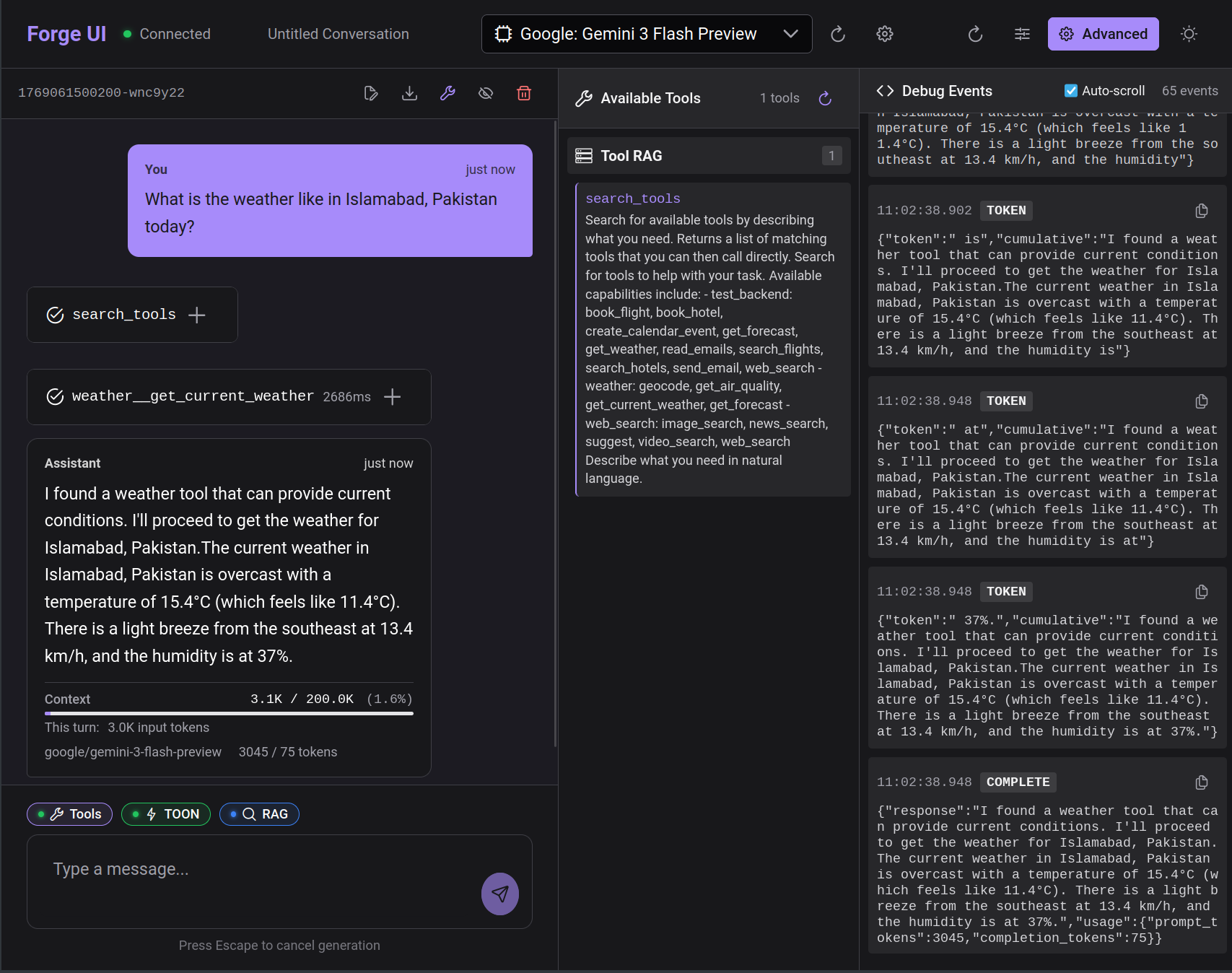
When enabled, the conversation starts with minimal context. The agent discovers tools as needed based on user requests.
When to Use Tool RAG
Tool RAG makes the most sense when:
- Large tool libraries — 10+ tools where loading all definitions is costly
- Varied task types — Different conversations need different tool subsets
- Cost-sensitive applications — Token savings compound across many requests
- Context-limited scenarios — Smaller models or long conversations where every token matters
It's less beneficial for:
- Small fixed tool sets — With 3-5 tools, the overhead of search may exceed the savings
- Latency-critical applications — The extra round-trip adds some latency (though auto-continue minimizes this)
- Highly specialized agents — If every conversation uses the same tools, dynamic discovery adds no value
What's Next
In an upcoming post, we'll share concrete benchmarks comparing token usage across three configurations: standard tool calling, TOON format optimization, and TOON + Tool RAG combined. Preliminary results show up to 58% token reduction when both optimizations are applied.
Source Code
- forge-armory — MCP gateway with Tool RAG support
- forge-orchestrator — Agent loop with RAG mode integration
- forge-ui — Chat interface with RAG toggle
References
- ToolRAG: Enhancing Large Language Model Tool Interaction — The research paper that inspired this implementation
- Model Context Protocol — The protocol standard for tool integration
- pgvector — Vector similarity search for PostgreSQL
This is part of a series on building Agentic Forge.