
Armory: An MCP Gateway for AI Agents
Published January 2026
Overview
Armory is to MCP servers what OpenRouter is to LLMs—one unified interface to many tool backends.
Just as OpenRouter provides a single API to access 400+ AI models from dozens of providers, Armory aggregates tools from multiple Model Context Protocol (MCP) servers into a single gateway. This eliminates the need to manage separate connections, handle different naming conventions, and maintain multiple integrations.
The Problem: Tool Fragmentation
As AI agents become more capable, they need access to more tools—weather data, web search, databases, APIs, and custom business logic. The MCP standard, introduced by Anthropic in November 2024, provides a protocol for exposing these tools to LLMs. With over 13,000 MCP servers now available on GitHub, the ecosystem is thriving.
But this growth creates a management challenge:
- Multiple endpoints: Each MCP server runs on its own URL
- Tool name collisions: Different servers might have tools with the same name (e.g.,
search) - No unified discovery: Clients must know about each server individually
- Connection overhead: Managing connections to many servers adds complexity
The Solution: Hybrid MCP Gateway
Armory solves this by acting as an MCP gateway that aggregates tools from multiple backend servers while preserving direct access when needed.
Endpoint Architecture
Armory exposes three types of endpoints:
| Endpoint | Purpose |
|---|---|
/mcp | Aggregated endpoint—all tools from all backends with prefixed names |
/mcp/{server} | Direct passthrough to a specific backend's tools (unprefixed) |
/.well-known/mcp.json | Discovery metadata for clients |
Tool Namespacing
To avoid collisions, tools are namespaced with a double-underscore prefix:
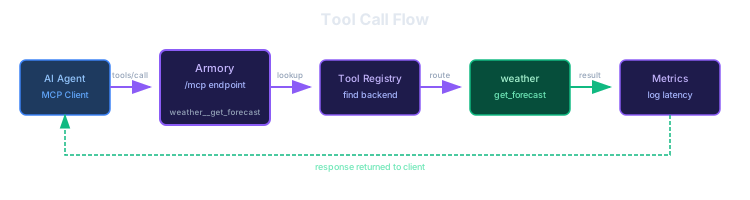
{backend_prefix}__{tool_name}For example, if you have a weather backend with a get_forecast tool, it becomes available as weather__get_forecast on the aggregated endpoint. Clients can still access the original get_forecast name via the /mcp/weather mount point.
Implementation
Armory is built with:
- FastAPI for the HTTP server and Admin API
- FastMCP Client for connecting to backend MCP servers
- SQLAlchemy with async support for the database layer
- SQLite (development) or PostgreSQL (production) for persistence
- Vue.js for the Admin UI
The gateway implements the MCP JSON-RPC protocol, handling initialize, tools/list, tools/call, and ping methods.
Backend Connection Flow
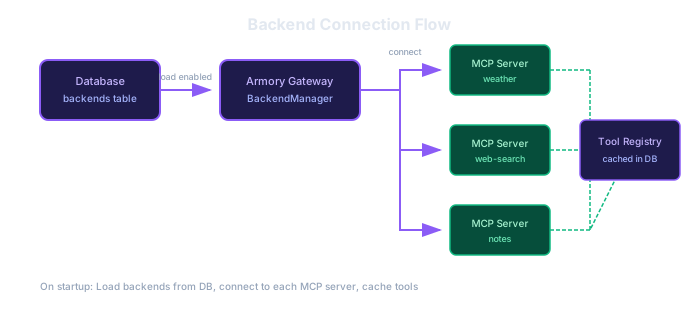
On startup, Armory loads enabled backends from the database, connects to each MCP server, and caches their available tools.
Tool Call Flow
When a client calls a tool through the aggregated endpoint, Armory looks up the tool in its registry, routes the call to the correct backend using the original (unprefixed) tool name, and records metrics.
The Admin UI
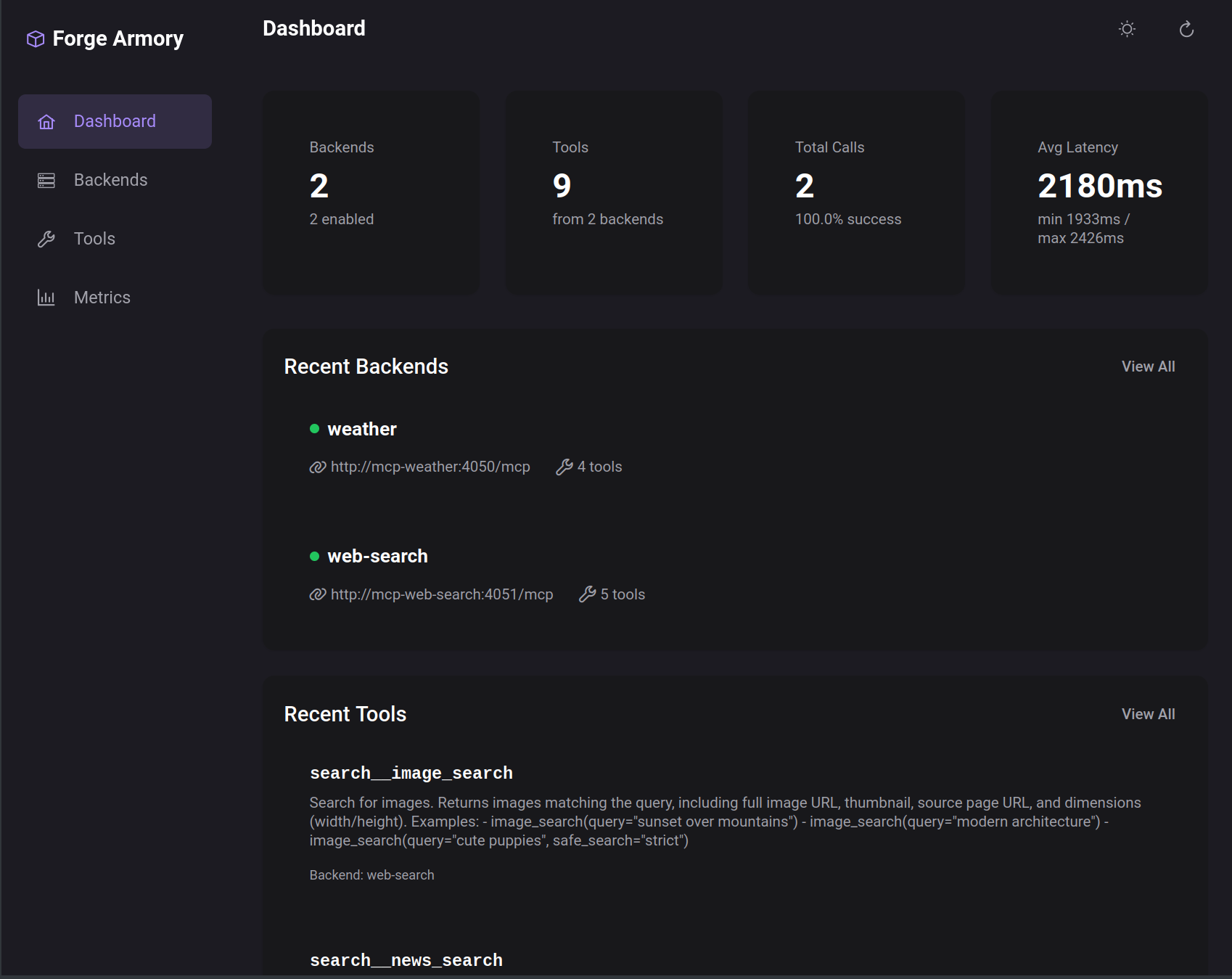
Armory includes a full-featured Admin UI for managing backends and monitoring tool usage.
Dashboard
The dashboard provides an at-a-glance view of:
- Connected backends and their status
- Total tools available across all backends
- Aggregate call metrics (total calls, success rate, average latency)
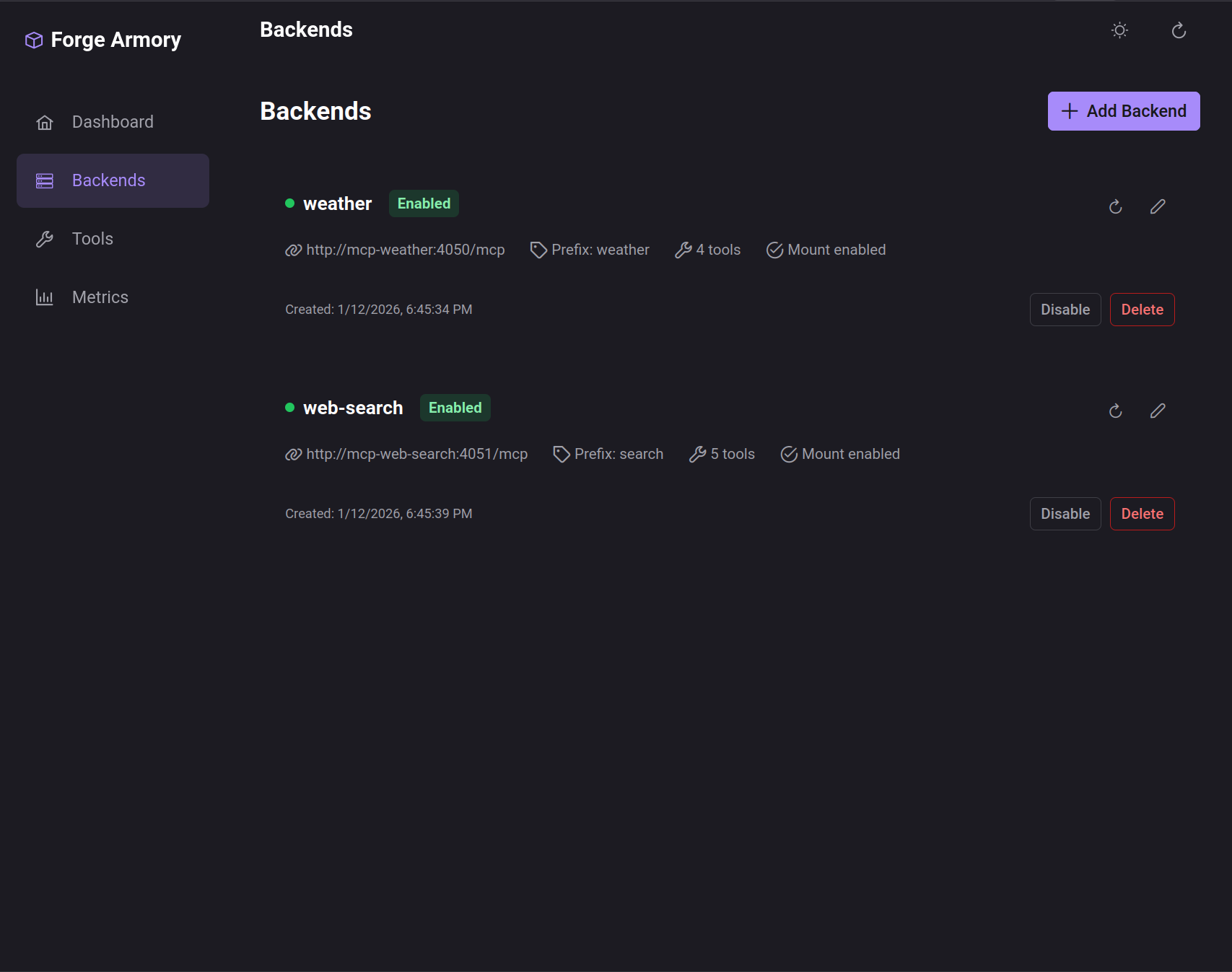
Backend Management
Add, configure, enable/disable, and refresh backends. Each backend can have:
- Custom URL prefix for namespacing
- Configurable timeout
- Mount point enabled/disabled (for direct access)
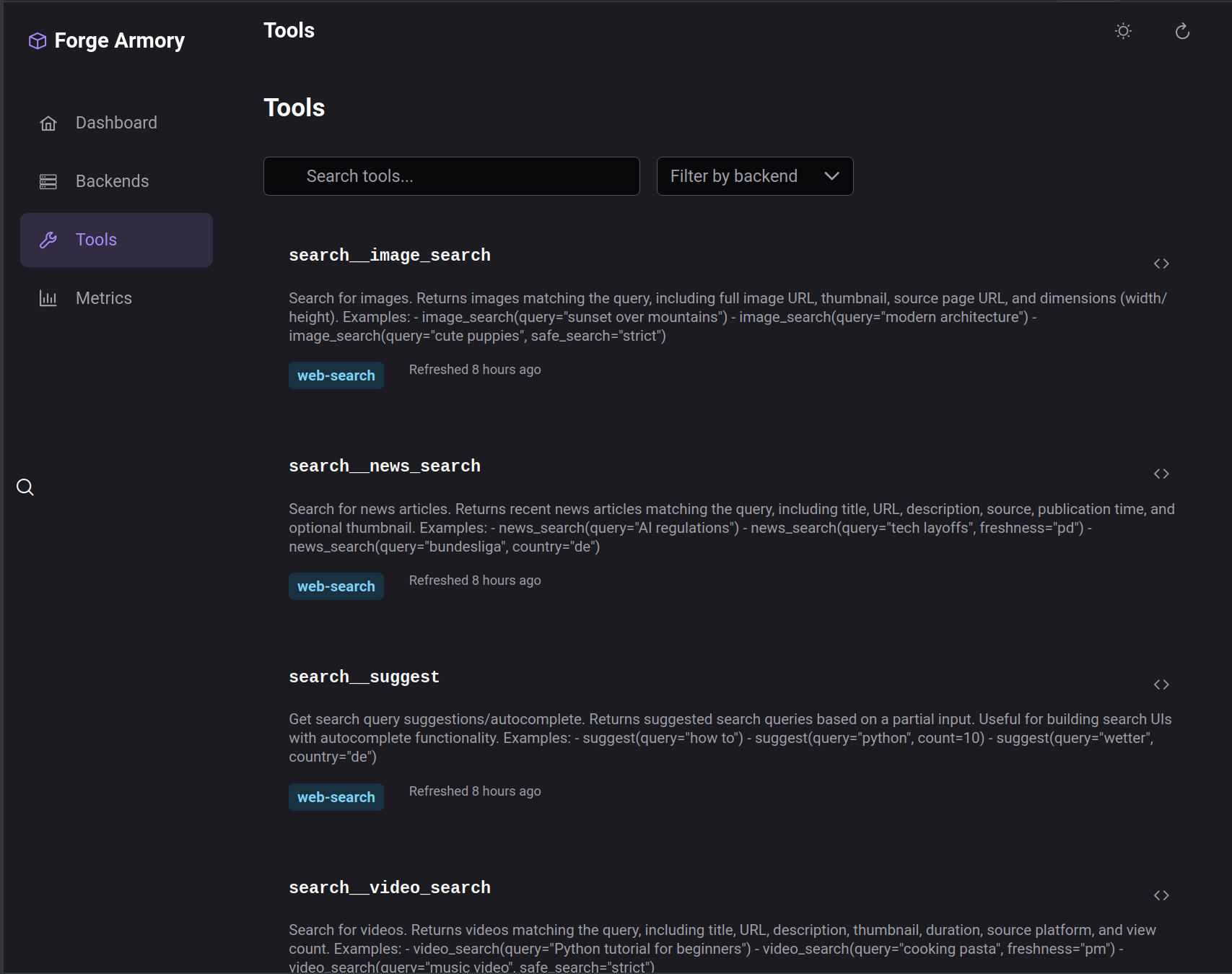
Tool Registry
Browse all available tools across backends with their descriptions and input schemas.
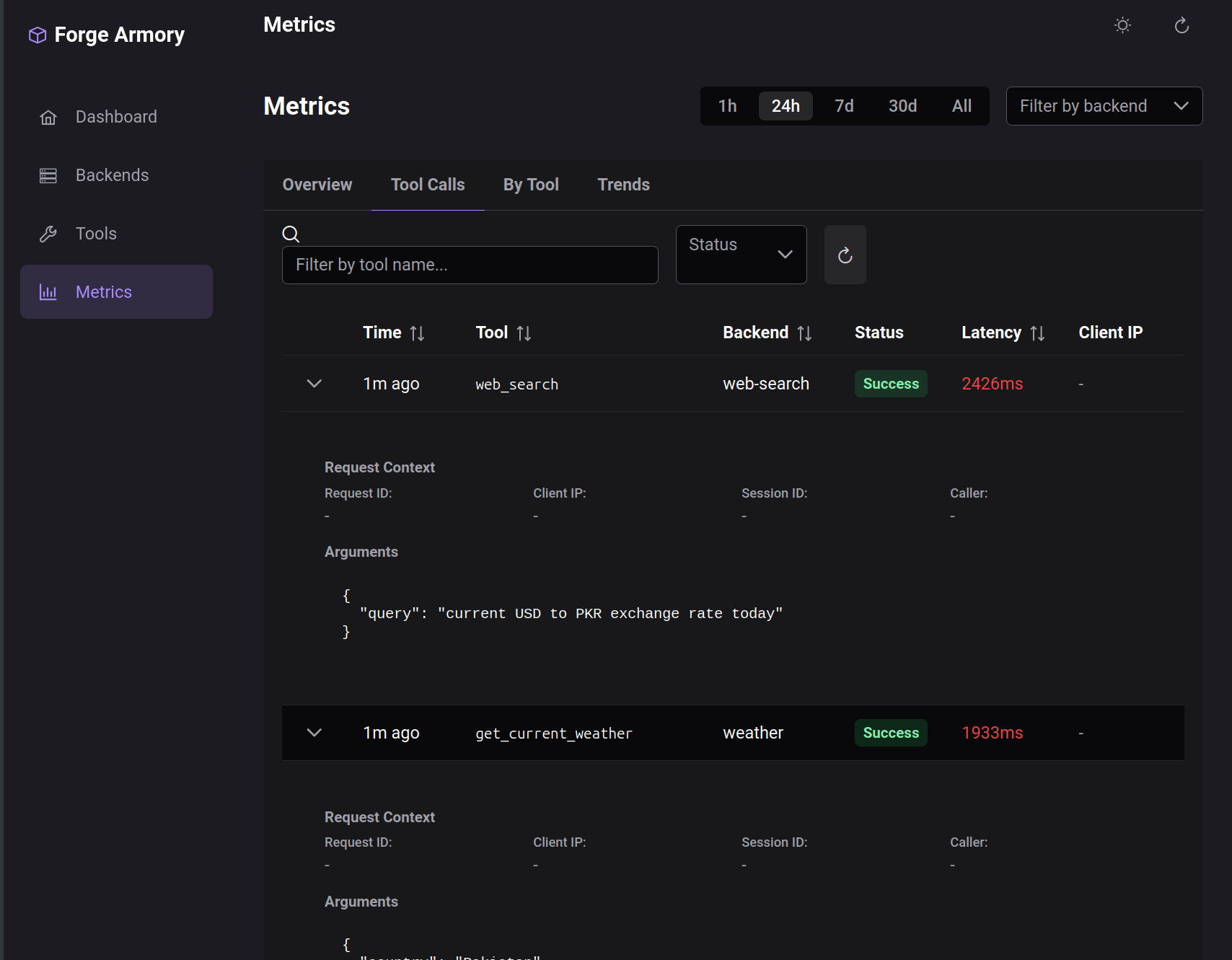
Metrics & Monitoring
Track tool call performance with:
- Success/error rates
- Latency percentiles (p50, p95, p99)
- Time-series charts for trend analysis
- Per-tool breakdown
Running Armory
Quick Start with Docker
# Clone the repo
git clone https://github.com/agentic-forge/forge-armory
cd forge-armory

# Start with Docker Compose
docker compose up
Local Development
# Install dependencies
uv sync

# Run the server
uv run armory serve

# Add a backend
uv run armory backend add weather --url http://localhost:4050/mcp
Environment Variables
ARMORY_DATABASE_URL=postgresql+asyncpg://user:pass@localhost:5432/forge_armory
ARMORY_HOST=0.0.0.0
ARMORY_PORT=4042
API Examples
Register a Backend
curl -X POST http://localhost:4042/admin/backends \
  -H "Content-Type: application/json" \
  -d '{
    "name": "weather",
    "url": "http://localhost:4050/mcp",
    "enabled": true
  }'
List Tools via MCP
curl -X POST http://localhost:4042/mcp \
  -H "Content-Type: application/json" \
  -d '{
    "jsonrpc": "2.0",
    "method": "tools/list",
    "id": 1
  }'
Response:
{
  "jsonrpc": "2.0",
  "result": {
    "tools": [
      {
        "name": "weather__get_forecast",
        "description": "Get weather forecast for a location",
        "inputSchema": { ... }
      }
    ]
  },
  "id": 1
}
Call a Tool
curl -X POST http://localhost:4042/mcp \
  -H "Content-Type: application/json" \
  -d '{
    "jsonrpc": "2.0",
    "method": "tools/call",
    "params": {
      "name": "weather__get_forecast",
      "arguments": {"location": "London"}
    },
    "id": 2
  }'
What's Next
Armory provides the foundation for more advanced agent patterns:
- Tool RAG: Dynamic tool selection using semantic search instead of loading all tools into context
- Protocol Adapters: Support for OpenAI Function Calling and other tool formats
- Rate Limiting & Auth: Production-ready access controls
- Caching: Cache tool responses for frequently-called operations
Source Code
- forge-armory — The MCP gateway
- forge-anvil — CLI and web UI for testing MCP servers
- mcp-weather — Example MCP server (Open-Meteo)
- mcp-web-search — Example MCP server (Brave Search)
References
- Model Context Protocol Specification
- FastMCP Documentation
- OpenRouter — Inspiration for the unified gateway approach
This is part of a series on building Agentic Forge.