
BYOK and Custom MCP Servers in Agentic Forge
January 2026
Three updates that make Agentic Forge more flexible and efficient: TOON optimization now works with custom MCP servers, you can add your own tools without server configuration, and a new BYOK model lets you use your own API keys.
TOON Format Moves to Orchestrator
Previously, TOON format optimization lived in Armory—our MCP gateway. Tool results were converted to TOON notation before being sent to the orchestrator, saving 30-60% on structured data tokens.
The limitation: only tools registered in Armory benefited from this optimization.
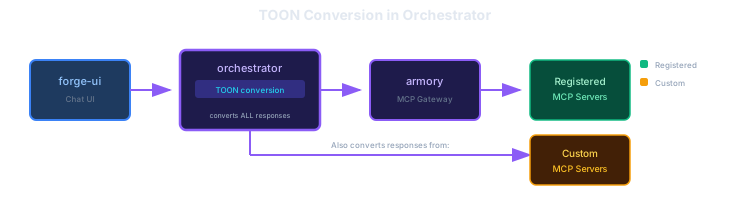
Now TOON conversion happens in the orchestrator. This means:
- Custom MCP servers get automatic optimization — Any server you add gets TOON formatting without modification
- Consistent token savings — All tool results, regardless of source, benefit from the same optimization
- No server-side changes needed — Your MCP servers return standard JSON; the orchestrator handles conversion
The orchestrator requests TOON format from Armory (which passes it through to registered servers), and also converts responses from custom servers that return JSON.
Custom MCP Server Support
You can now add any MCP server directly from the chat interface—no server-side configuration required.
In the tools panel, click "Add Custom Server" and provide:
- URL — The MCP server endpoint (must support Streamable HTTP transport)
- API Key (optional) — For authenticated servers
The orchestrator connects to your server for the duration of the session. Your server's tools appear alongside the built-in tools, and the LLM can use them normally.
Use Cases
- Private tools — Connect to company-internal MCP servers without exposing them publicly
- Development — Test MCP servers you're building without deploying to Armory
- Specialized tools — Add domain-specific servers for particular tasks
- Experimentation — Try third-party MCP servers before deciding to integrate them
Security Note
Custom servers run in session scope only. The server URL and API key are passed from your browser to the orchestrator per-request—they're not stored on our servers.
BYOK: Bring Your Own Key
Agentic Forge now supports a "Bring Your Own Key" model. Instead of using shared API keys, you provide your own keys for the LLM providers you want to use.
Why BYOK?
- Privacy — Your API keys are stored in your browser only, never on our servers
- Flexibility — Switch between providers freely without configuration changes
- Cost control — You pay only for what you use, directly to the provider
- No rate limits — Use your own quotas instead of shared limits
Supported Providers
| Provider | Key Format | Models |
|---|---|---|
| OpenRouter | sk-or-v1-... | 300+ models from various providers |
| OpenAI | sk-proj-... | GPT-4o, GPT-4 Turbo, o1, etc. |
| Anthropic | sk-ant-... | Claude 3.5/4 Sonnet, Opus, Haiku |
AIza... | Gemini 1.5/2.0 Pro, Flash |
How It Works
- Open Model Management (gear icon in model selector)
- Enter your API key for the provider you want to use
- Click the check button to save your key
- Click "Fetch" to load available models from your provider
- Select a model from that provider
- Start chatting
Your key is sent with each request via the X-LLM-Key header—it's used for that request only and never persisted server-side.
Recommendation
If you're not sure which provider to start with, OpenRouter gives you access to 300+ models with a single API key. You can try different models without managing multiple provider accounts.
What's Next
These changes set the stage for our public demo launch. In the next post, we'll announce the live demo and walk through getting started.
Source Code
- forge-orchestrator — LLM orchestrator with TOON and BYOK support
- forge-ui — Chat interface with custom MCP server support
- forge-armory — MCP gateway
Previous Posts
- Cutting Context by 60%: TOON Format + Tool RAG — Measuring the combined optimization impact
- Tool RAG: Dynamic Tool Discovery — How Tool RAG works
- TOON Format Support — TOON in Agentic Forge
This is part of a series on building Agentic Forge.