
MCP Apps: Interactive Tools for AI Agents
February 2026
AI tool calling has a limitation: it's one-way. The LLM calls a tool, gets a result, and moves on. But what if the tool needs user input that's hard to describe in words—like picking a location on a map? We've implemented MCP Apps in Agentic Forge to bridge this gap, starting with an interactive location picker for our weather server.
The Problem: Some Inputs Need a UI
Consider asking an agent: "What's the weather at my favorite hiking spot?"
The agent can call a weather API, but it doesn't know where your hiking spot is. It could ask you to describe it, but coordinates from memory are imprecise. What if you could just... point to it on a map?
This is the kind of interaction that text-based tools can't handle well. You need a visual interface.
What are MCP Apps?
MCP Apps are an extension to the Model Context Protocol that allows tools to include interactive UI components. When a tool returns a response with UI metadata, the host application renders the interface in a sandboxed iframe, letting users interact directly before the conversation continues.
The specification was introduced by Anthropic in November 2025 and reached stable 1.0 in January 2026. It's since been adopted by major platforms including OpenAI's ChatGPT.
Our First MCP App: Location Picker
We built a location picker app for the weather MCP server. Here it is in action:
The flow works like this:
- User asks about weather at an unspecified location
- Agent calls the
pick_locationtool - Map UI appears with search and click-to-select
- User picks their location visually
- Agent continues with the selected coordinates
No need to describe latitude/longitude or spell out addresses—just point and click.
Architecture
MCP Apps add a UI layer on top of standard tool calling:
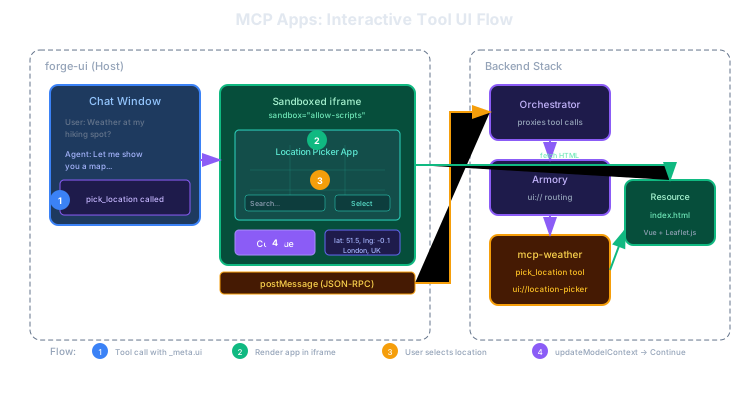
The diagram shows the complete flow:
- The agent calls
pick_location, which returns a_meta.uifield pointing to a UI resource - forge-ui fetches the HTML from the MCP server (via Armory) and renders it in a sandboxed iframe
- The user interacts with the map—clicking to select a location or searching by name
- When the user clicks "Continue", the app calls
updateModelContextto pass the selected coordinates back to the conversation
The app runs completely sandboxed—no access to the parent page's DOM or storage. Communication happens through JSON-RPC messages over postMessage.
How It Works
Server Side
The MCP server defines both the tool and the UI resource. The tool returns a _meta.ui field containing the resource URI, required permissions (like geolocation), and whether user interaction is required before continuing.
App Side
The location picker is a Vue 3 app bundled to a single HTML file using vite-plugin-singlefile. It uses the official @modelcontextprotocol/ext-apps SDK for communication with the host.
The app can call tools on its parent MCP server—the geocoding search reuses the weather server's existing geocode tool rather than implementing its own. When the user selects a location, the app calls updateModelContext to send the coordinates back.
Host Side
forge-ui's McpAppRenderer component handles rendering and message routing. It fetches the HTML resource, creates the sandboxed iframe, and sets up the JSON-RPC bridge. When the app calls updateModelContext, the host captures the data and makes it available for the LLM's next turn.
Security Model
MCP Apps run in sandboxed iframes with minimal permissions:
- Sandboxed execution —
allow-scripts allow-formsonly, no access to parent DOM - Origin validation — Communication only via
postMessagewith source verification - Permission requests — Apps can request additional permissions (like
geolocation) which the host may grant - Proxied tool calls — All tool calls go through the host, maintaining an audit trail
This means a malicious MCP App can't steal cookies, access local storage, or manipulate the chat interface.
Building Your Own MCP Apps
The location picker serves as a reference implementation. The key components are:
| File | Purpose |
|---|---|
src/App.vue | Main component, state management |
src/composables/useAppBridge.ts | JSON-RPC bridge to host |
src/components/MapView.vue | Leaflet.js map rendering |
vite.config.ts | Bundle to single HTML file |
The build produces a self-contained HTML file with inlined JS and CSS. Deployment is simple—just serve the file as a text resource from your MCP server.
What's Next
The location picker is our first MCP App, but the pattern opens up many possibilities:
- Weather Explorer — Interactive dashboard with charts and forecasts
- Search Refinement — Visual filters for web search results
- Data Visualization — Charts and graphs for analytical tools
- Form Builders — Complex input collection that would be tedious in text
We're also working on dark/light theme synchronization so apps match the host's appearance automatically.
Try It
The location picker is available in the demo. Ask the agent about weather at a location and see the map appear.
Source Code
- mcp-weather — Weather server with location picker app
- forge-ui — Host implementation with McpAppRenderer
- forge-armory — Gateway with ui:// resource routing
References
- MCP Apps Announcement — Original introduction
- MCP Apps 1.0 Specification — Stable release
- @modelcontextprotocol/ext-apps — Official SDK
- OpenAI MCP Apps Integration — ChatGPT adoption
This is part of a series on building Agentic Forge.