
Getting Started with Agentic Forge
January 2026
This tutorial walks you through setting up the complete Agentic Forge stack—from cloning the repositories to running your first AI-powered conversation with tools.
Prerequisites
- Docker and Docker Compose (recommended) or native tooling (Python 3.12+, Node.js/Bun)
- API Key — At minimum, one LLM provider key (OpenRouter recommended for simplicity)
- Optional — Brave Search API key for web search functionality
Architecture Overview
Agentic Forge consists of several services that work together:
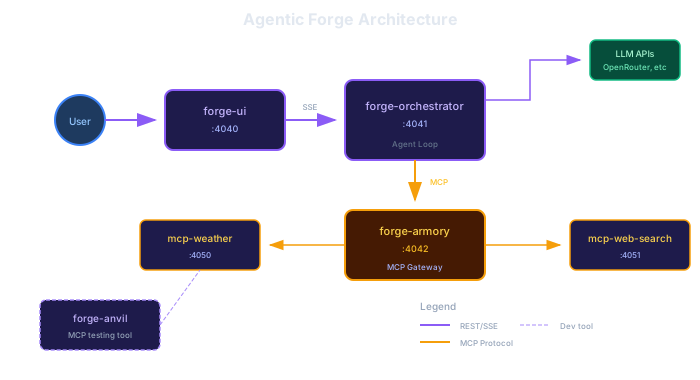
| Service | Port | Description |
|---|---|---|
| forge-ui | 4040 | Vue.js chat interface |
| forge-orchestrator | 4041 | LLM agent loop with multi-provider support |
| forge-armory | 4042 | MCP protocol gateway |
| mcp-weather | 4050 | Weather tool (Open-Meteo API) |
| mcp-web-search | 4051 | Web search tool (Brave Search API) |
Quick Start with Docker (5 Minutes)
The fastest way to get everything running:
# Clone the devtools repository
git clone https://github.com/agentic-forge/forge-devtools.git
cd forge-devtools

# Clone all Forge repositories
./scripts/clone-repos.sh

# Copy environment template and add your API keys
cp .env.example .env

# Edit .env and add at least one LLM provider key
# OPENROUTER_API_KEY=sk-or-...  (recommended - access to 200+ models)

# Start all services
docker compose up
Open http://localhost:4040 in your browser.
Getting API Keys
You need at least one LLM provider API key:
| Provider | Get Key | Notes |
|---|---|---|
| OpenRouter | Recommended | Access to 200+ models with one key |
| OpenAI | GPT-4, GPT-4o | |
| Anthropic | Claude models | |
| Gemini models |
Optional but recommended:
- Brave Search API — For web search functionality (free tier: 2,000 queries/month)
Your First Conversation
Once the services are running:
- Open http://localhost:4040
- Select a model from the dropdown
- Ask about the weather: "What's the weather like in Tokyo?"
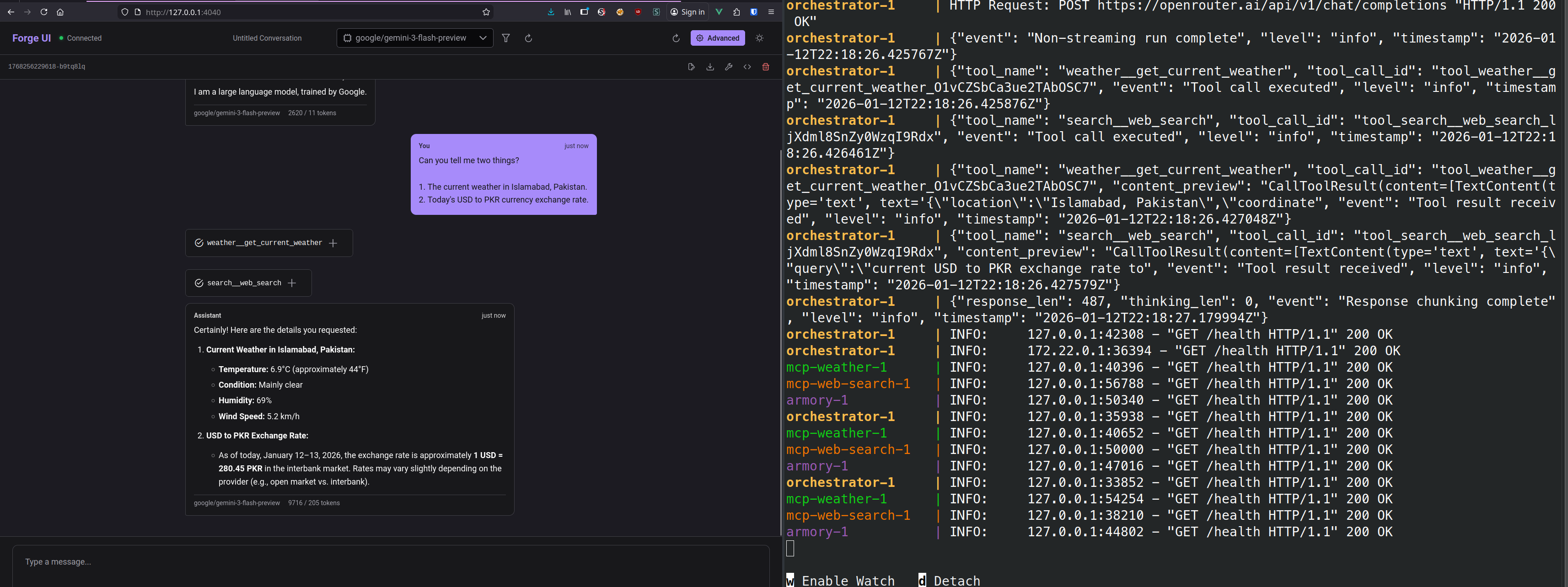
You'll see the agent:
- Process your request
- Call the
weather__get_forecasttool - Display the tool execution with latency
- Return a natural language response
Native Development (Without Docker)
For active development with hot reload, use the tmux-based scripts:
# Prerequisites: tmux, uv (Python), bun (Node.js), PostgreSQL
cd forge-devtools

# Start all services in tmux panes
./scripts/dev-start.sh

# Reattach to the tmux session
tmux attach -t forge

# Stop all services
./scripts/dev-stop.sh
Each service runs in its own tmux pane with hot reload enabled.
Testing MCP Servers with Anvil
Forge Anvil is an MCP client tool for testing and debugging MCP servers. Use it to verify your tools work before integrating them:
# In the forge-anvil directory
cd forge-anvil
uv sync

# Set the MCP server URL
export ANVIL_SERVER=http://localhost:4050/mcp

# List available tools
anvil list-tools

# Call a tool
anvil call get_current_weather --arg city=London

# Launch the web inspector
anvil ui
Anvil's web UI provides an interactive interface for exploring tools and testing them with different arguments.
Adding Custom Tools
To add your own MCP tools:
1. Create an MCP Server
Use FastMCP to build a new server:
from fastmcp import FastMCP

mcp = FastMCP("my-tools")

@mcp.tool
def my_tool(param: str) -> str:
    """Description of what this tool does."""
    return f"Result for {param}"

if __name__ == "__main__":
    mcp.run(transport="http", port=8000)
2. Register with Armory
Add the backend via the Armory Admin UI at http://localhost:4043/ui/ or via CLI:
curl -X POST http://localhost:4042/admin/backends \
  -H "Content-Type: application/json" \
  -d '{"name": "my-tools", "url": "http://localhost:8000/mcp", "enabled": true}'
3. Test with Anvil
Verify your tools work:
anvil list-tools --server http://localhost:8000/mcp
anvil call my_tool --arg param=test
Service Health Checks
Check if services are running:
# Orchestrator
curl http://localhost:4041/health

# Armory
curl http://localhost:4042/health

# MCP Weather
curl http://localhost:4050/health
Troubleshooting
No tools available
Check that Armory can reach the MCP servers:
curl http://localhost:4042/admin/backendsIf backends show as disconnected, verify the MCP servers are running.
Model errors
Verify your API keys are set correctly in .env. Check the orchestrator logs:
docker compose logs orchestratorConnection refused
Ensure all services are running:
docker compose psNext Steps
- Multi-Provider Orchestrator — How model routing works
- Armory MCP Gateway — Deep-dive into tool aggregation
- Streaming Tool Calls — Real-time SSE implementation
Source Code
- forge-devtools — Docker Compose and development scripts
- forge-anvil — MCP testing tool
This is part of a series on building Agentic Forge.