
Streaming Tool Calls in Real-Time
January 2026
When an AI agent executes tools, users need visibility into what's happening. A weather lookup might take a second. A web search might take longer. Without feedback, users are left staring at a blank screen wondering if anything is working.
We built real-time streaming into Forge with tool call visualization, thinking tokens, and a reactive UI that shows every step of the agent's work.
The Challenge: Showing Progress
Traditional request/response APIs don't work well for AI agents:
- LLM responses stream — Text arrives token by token over several seconds
- Tool calls interrupt — The model pauses to execute tools mid-response
- Thinking takes time — Reasoning models produce intermediate output before answering
- Latency varies — Some tools return instantly, others take seconds
Users need to see what's happening at each stage.
SSE Event Architecture
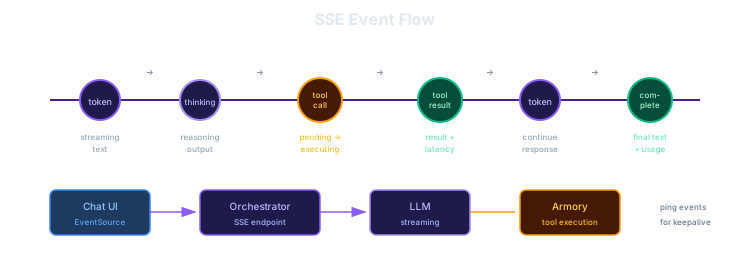
We use Server-Sent Events (SSE) to push real-time updates from the orchestrator to the UI. SSE is simpler than WebSockets for unidirectional streaming and works natively with the browser's EventSource API.
Event Types
The orchestrator emits these event types:
| Event | Purpose |
|---|---|
token | Streaming text tokens as they arrive from the LLM |
thinking | Reasoning/chain-of-thought output from thinking models |
tool_call | Tool invocation with status (pending → executing → complete) |
tool_result | Execution result with latency timing |
complete | Final response with token usage stats |
error | Error information with retry hints |
ping | Heartbeat for connection health |
Token Events
As the LLM generates text, we emit each token along with the cumulative text so far:
{
  "event": "token",
  "data": {
    "token": " weather",
    "cumulative": "The weather in London"
  }
}
The cumulative field lets the UI recover if events are missed.
Tool Call Lifecycle
Tool calls go through multiple status transitions:
- pending — LLM requested a tool call, waiting to execute
- executing — Tool is running (call sent to Armory)
- complete — Tool returned a result (success or error)
{
  "event": "tool_call",
  "data": {
    "id": "call_abc123",
    "tool_name": "weather__get_forecast",
    "arguments": {"city": "London", "days": 3},
    "status": "executing"
  }
}
When the tool completes, a separate tool_result event provides the result and latency:
{
  "event": "tool_result",
  "data": {
    "tool_call_id": "call_abc123",
    "result": {"temperature": 18, "conditions": "Partly cloudy"},
    "is_error": false,
    "latency_ms": 245
  }
}
Thinking Events
Reasoning models like deepseek-r1 produce extended thinking output before their final answer. We stream this separately so the UI can display it distinctly:
{
  "event": "thinking",
  "data": {
    "content": "Let me check the weather API...",
    "cumulative": "The user wants weather for London. Let me check the weather API..."
  }
}
The UI: Real-Time Updates
The chat interface subscribes to the SSE stream and updates reactively as events arrive.
Tool Call Cards
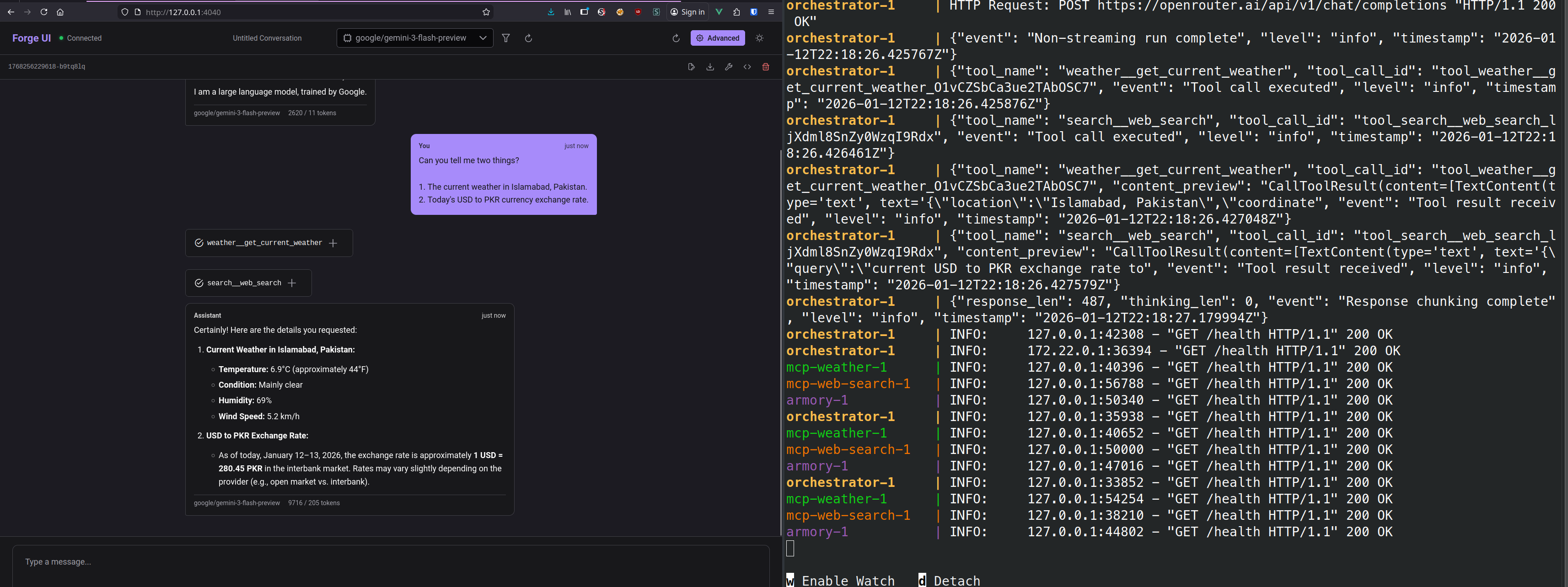
Each tool call renders as a collapsible card showing:
- Tool name and status indicator (spinner while executing)
- Arguments passed to the tool
- Result when complete (with latency)
The status indicator animates through states:
- 🕐 Pending — Yellow clock
- ⚡ Executing — Spinning purple indicator
- ✓ Complete — Green checkmark
- ✗ Error — Red X
Tools Panel
A sidebar panel shows all active tool calls across the conversation, letting users track parallel executions and spot slow operations.
Thinking Display
When a thinking model is used, the reasoning tokens appear in a collapsible section above the final response, letting users see the model's chain of thought.
Connection Handling
Heartbeats
The orchestrator sends ping events at regular intervals (default: 30 seconds) to keep the connection alive and detect stale connections:
{
  "event": "ping",
  "data": {"timestamp": 1704067200}
}
Error Recovery
If the connection drops or an error occurs, the error event includes a retryable flag:
{
  "event": "error",
  "data": {
    "code": "STREAM_ERROR",
    "message": "Connection to LLM provider failed",
    "retryable": true
  }
}
The UI can use this to decide whether to prompt the user to retry or show a permanent error.
Stateless Architecture
The orchestrator is completely stateless. Each request includes the full conversation history:
{
  "user_message": "What's the weather in Tokyo?",
  "messages": [
    {"role": "user", "content": "Hello"},
    {"role": "assistant", "content": "Hi! How can I help?"}
  ],
  "model": "anthropic/claude-sonnet-4"
}
The UI owns conversation state. This enables:
- Horizontal scaling (any orchestrator instance handles any request)
- Simple deployment (no session storage needed)
- Client-side conversation management (export, fork, edit history)
Source Code
- forge-orchestrator — SSE streaming implementation
- forge-ui — Vue.js chat interface
This is part of a series on building Agentic Forge.